MCP Server
Connect AI agents to your data via Model Context Protocol
MCP Server
01.software provides an MCP (Model Context Protocol) server that lets AI agents interact with your collections directly. Query, create, update, and delete data through natural language in tools like Claude, Cursor, VS Code, and more.
Setup
Get API Keys
In the 01.software Console, go to your tenant settings to find your API keys. Generate a new API key (opaque bearer token) directly from the Console.
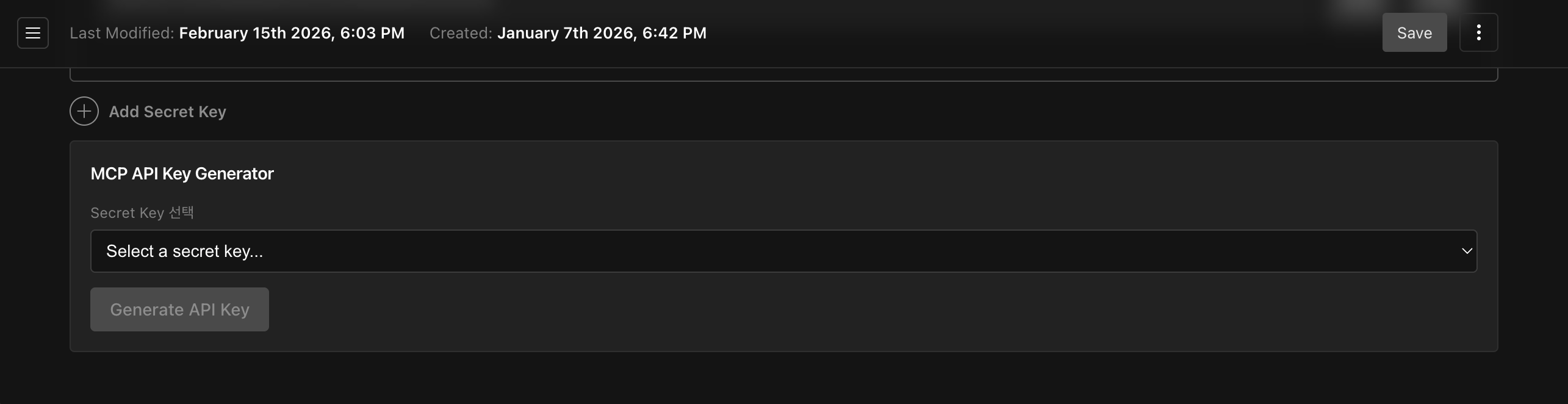
- Publishable Key — Public key (read-only,
pk01_...) - Secret Key — Private key for MCP authentication (read/write,
sk01_...)
To generate the API key manually, see the CLI authentication docs.
Configure Your Client
Add the MCP server to your AI tool of choice.
Add via CLI command:
claude mcp add --transport http \
  --header "x-api-key: <your-api-key>" \
  01software https://mcp.01.software/mcp
Or create .mcp.json at your project root:
{
  "mcpServers": {
    "01software": {
      "type": "http",
      "url": "https://mcp.01.software/mcp",
      "headers": {
        "x-api-key": "<your-api-key>"
      }
    }
  }
}
Add to .cursor/mcp.json (project root or ~/.cursor/mcp.json):
{
  "mcpServers": {
    "01software": {
      "url": "https://mcp.01.software/mcp",
      "headers": {
        "x-api-key": "<your-api-key>"
      }
    }
  }
}
Add to ~/.codeium/windsurf/mcp_config.json:
{
  "mcpServers": {
    "01software": {
      "serverUrl": "https://mcp.01.software/mcp",
      "headers": {
        "x-api-key": "<your-api-key>"
      }
    }
  }
}serverUrl instead of url.Add to .vscode/mcp.json:
{
  "inputs": [
    {
      "type": "promptString",
      "id": "01software-api-key",
      "description": "01.software API Key",
      "password": true
    }
  ],
  "servers": {
    "01software": {
      "type": "http",
      "url": "https://mcp.01.software/mcp",
      "headers": {
        "x-api-key": "${input:01software-api-key}"
      }
    }
  }
}
VS Code uses servers instead of mcpServers. The inputs array lets you
securely prompt for the API key.
Add to claude_desktop_config.json:
{
  "mcpServers": {
    "01software": {
      "url": "https://mcp.01.software/mcp",
      "headers": {
        "x-api-key": "<your-api-key>"
      }
    }
  }
}
macOS: ~/Library/Application Support/Claude/claude_desktop_config.json
Windows: %APPDATA%\Claude\claude_desktop_config.json
Available Tools
The MCP server provides 35 tools for collection CRUD and ecommerce operations.
Generic CRUD (7)
| Tool | Description |
|---|---|
query-collection | Query a collection with filtering, sorting, and pagination |
get-collection-by-id | Get a single item by ID |
create-collection | Create a new item |
update-collection | Update an existing item |
delete-collection | Delete an item |
update-many-collection | Bulk update items matching a filter |
delete-many-collection | Bulk delete items matching a filter |
Order & Fulfillment (7)
| Tool | Description |
|---|---|
create-order | Create order with products and shipping |
update-order | Update order status (auto stock adjustment) |
get-order | Get order by order number |
checkout | Convert cart to order (stock validation) |
create-fulfillment | Create shipment for order items |
update-fulfillment | Update fulfillment status (FSM: pending→packed→shipped→delivered) |
update-transaction | Update transaction status |
Returns (3)
| Tool | Description |
|---|---|
create-return | Create return request (delivered/confirmed orders) |
update-return | Update return status (FSM validated) |
return-with-refund | Combined return + refund operation |
Cart (6)
| Tool | Description |
|---|---|
add-cart-item | Add product to cart (stock validated) |
update-cart-item | Update cart item quantity |
remove-cart-item | Remove item from cart |
apply-discount | Apply a discount code to a cart |
remove-discount | Remove the applied discount from a cart |
clear-cart | Remove all items and reset discount/amounts |
Product (1)
| Tool | Description |
|---|---|
stock-check | Batch check product option stock availability |
Validation (2)
| Tool | Description |
|---|---|
validate-discount | Validate a discount code against an order amount |
calculate-shipping | Calculate shipping fee from a policy |
Schema (1)
| Tool | Description |
|---|---|
get-collection-schema | Get the authoritative tenant-aware schema for a collection |
Tenant Context (1)
| Tool | Description |
|---|---|
get-tenant-context | Get current tenant configuration and feature flags |
Field Config (2)
| Tool | Description |
|---|---|
list-configurable-fields | List all configurable fields with current visibility state |
update-field-config | Update field visibility configuration for a collection |
Guidance (4)
| Tool | Description |
|---|---|
sdk-get-recipe | Get SDK code recipe for a specific use case |
sdk-search-docs | Search SDK documentation |
sdk-get-auth-setup | Get auth setup guide for a specific framework |
sdk-get-collection-pattern | Get collection usage pattern for a specific collection |
Write operations require a Secret Key. If you only provided a Publishable Key, only read operations will be available.
Usage Examples
Once configured, you can interact with your data using natural language:
- "Show me the latest 10 published products"
- "Create a new post with title 'Hello World'"
- "Update all draft posts to published status"
- "How many orders were created this month?"
- "Delete the product with ID abc123"
Prompts
The MCP server includes built-in prompts to help AI assistants understand your data:
| Prompt | Description |
|---|---|
sdk-usage-guide | SDK usage patterns and best practices |
collection-query-help | Query writing assistance for specific collections |
order-flow-guide | Order flow and ecommerce workflow guide |
feature-setup-guide | Feature setup checklist and remediation guide |
Resources
The MCP server exposes documentation and schema information as resources:
| Resource | URI | Description |
|---|---|---|
| App Config | config://app | Application configuration |
| Collection Schema | collections://schema | Collection field definitions |
| Getting Started | docs://sdk/getting-started | Onboarding guide |
| Guides | docs://sdk/guides | Usage guides |
| API Reference | docs://sdk/api | REST API documentation |
| Query Builder | docs://sdk/query-builder | Query builder reference |
| React Query | docs://sdk/react-query | React Query hooks guide |
| Server API | docs://sdk/server-api | Server-side API usage |
| Customer Auth | docs://sdk/customer-auth | Customer authentication guide |
| Browser vs Server | docs://sdk/browser-vs-server | Client-side vs server-side guide |
| File Upload | docs://sdk/file-upload | File upload guide |
| Webhook | docs://sdk/webhook | Webhook integration guide |
Supported Collections
All SDK-accessible collections are available through MCP:
- Tenant — tenants, tenant-metadata, tenant-logos
- Products — products, product-variants, product-options, product-categories, product-tags, product-collections, brands, brand-logos
- Orders — orders, order-items, returns, return-items, fulfillments, fulfillment-items, transactions
- Customers — customers, customer-addresses, customer-groups
- Carts — carts, cart-items, discounts, shipping-policies
- Documents — documents, document-categories, document-types
- Posts — posts, post-authors, post-categories, post-tags
- Playlists — playlists, playlist-categories, playlist-tags, playlist-tracks, tracks, track-assets, track-categories, track-tags
- Galleries — galleries, gallery-items, gallery-categories, gallery-tags
- Links — links, link-categories, link-tags
- Canvas — canvases, canvas-node-types, canvas-edge-types, canvas-categories, canvas-tags
- Videos — videos, video-categories, video-tags
- Live Streams — live-streams
- Community — threads, comments, reactions, reaction-types, bookmarks, thread-categories, reports, community-bans
- Images — images
- Forms — forms, form-submissions
Security
- Store your API key securely. Do not share it or commit it to version control.
- Use environment variables in production environments.
- The API key is an opaque bearer token (
sk01_...) that grants full read/write access to your tenant.
Next Steps
- llms.txt — Export documentation for LLM consumption
- Authentication — API key details
- Collections — Available collections and their fields
Last Updated: 2026-04-09